

Best gaming monitors for small desk setups in 2026
Best overall: DOUGH ES07D03 Spectrum One Matte. Best for a glossy 4K setup: DOUGH ES07DC9 Spectrum One Glossy. Best for refresh-rate-focused gaming: DOUGH ES07EF5 Spectrum Black. This 2026 gaming monitor guide compares those choices with the glass-equipped DOUGH ES07EFB, with desk fit as the first buying check.
- The DOUGH ES07D03 is the default gaming monitor pick when you want a matte screen and USB-C docking.
- Choose the DOUGH ES07DC9 for a glossy 4K screen with a listed 144-Hz refresh rate.
- Choose the DOUGH ES07EF5 for QHD OLED gaming with a listed 480-Hz refresh rate.
- Measure stand depth, screen position, and cable clearance before choosing any small-desk monitor.
Why this matters
A screen that fits across your desk can still leave too little room for your keyboard. The stand, rear connectors, and viewing position decide whether a monitor actually fits your setup.
Scott Radio & Electronics sells consumer electronics alongside vintage CB replacement parts. For this gaming monitor shortlist, apply the same exact-fit discipline used when choosing a replacement component: match the documented specifications to the job, rather than buying from appearance alone. Browse Scott Radio & Electronics with your measurements beside you.
The DOUGH ES07D03 is the best default here for small-desk buyers who want a matte 4K gaming monitor with USB-C docking. That recommendation depends on confirming the stand footprint and connection requirements before ordering; a 27-inch diagonal alone does not establish desk fit.
What makes the best gaming monitor for a small desk?
Use these criteria to assess the 2026 shortlist before comparing panel features:
- Physical fit: Confirm overall width, stand depth, screen position, and room for rear cables. Screen diagonal is not a footprint measurement.
- Surface finish: Choose matte or glossy deliberately. Check where windows and lamps sit relative to the screen.
- Resolution: Match 4K or QHD to the games you play, your graphics hardware, and your desktop-work preferences.
- Refresh rate: Choose a refresh-rate target your computer and connection can support at the intended resolution.
- Connections: Match the exact ports and supported operating modes. A USB-C dock label does not establish charging power or every dock function.
- Mounting: Confirm stand contents, adjustment range, and any arm compatibility before planning your layout around them.
A small-desk recommendation needs to pass the physical-fit check before its display specifications matter. Do not trade away usable mouse space just to reach a higher refresh-rate figure.
Gaming monitors at a glance
The supplied catalog identifies these display features. The limitations below identify the checks that remain necessary before buying, not faults established through hands-on testing.
| Rank and monitor | Best for | Standout listed feature | Key limitation or buying check |
|---|---|---|---|
| DOUGH ES07D03 Spectrum One Matte | Mixed gaming and desktop work with a matte preference | 27-inch 4K HDR, 144 Hz, USB-C dock | Stand footprint and dock capabilities need confirmation |
| DOUGH ES07DC9 Spectrum One Glossy | Buyers who specifically prefer a glossy screen | 27-inch 4K HDR, 144 Hz, USB-C dock | Check reflections from the actual seating position |
| DOUGH ES07EF5 Spectrum Black | Refresh-rate-focused QHD gaming | 27-inch-class QHD OLED, 480 Hz | Confirm source-device support and mounting details |
| DOUGH ES07EFB Spectrum Black with Gorilla Glass | Buyers specifically seeking the glass-equipped version | 27-inch-class QHD OLED, 480 Hz, Gorilla Glass | Glass specification does not establish glare behavior or desk fit |
1. DOUGH ES07D03: best gaming monitor for a matte mixed-use desk
The DOUGH ES07D03 Spectrum One combines a 27-inch 4K HDR display, a listed 144-Hz refresh rate, and a USB-C dock. Its matte finish makes it the first option to assess when you want a screen for both gaming and everyday desktop work without choosing a glossy surface.
The important small-desk question is where the screen ends up once the stand is installed. Confirm that position before assuming the desk has enough depth for comfortable keyboard placement.
DOUGH ES07D03 pros:
- The listed 4K resolution suits buyers who specifically want that resolution for games and desktop use.
- The 144-Hz specification gives you a clear refresh-rate target to check against your computer.
- The USB-C dock is relevant to buyers planning a laptop-connected workspace.
- The explicitly listed matte finish removes uncertainty about which surface version you are comparing.
DOUGH ES07D03 cons:
- Its listed 144-Hz ceiling is below the 480-Hz specification of the Spectrum Black choices here.
- The product details supplied do not establish stand dimensions, charging output, or the dock's full connection list.
Best for: You want a matte 4K display and intend to verify the dock rather than assume it replaces every laptop connection.
Before buying, identify your laptop or graphics-card model and the connection you plan to use. Ask for confirmation of the resolution and refresh rate supported through that connection, plus any charging requirement.
Verdict: Buy the DOUGH ES07D03 when matte 4K is your priority and the documented footprint fits.
2. DOUGH ES07DC9: best gaming monitor for a glossy 4K setup
The DOUGH ES07DC9 Spectrum One lists the same headline display size, resolution, refresh rate, and docking category as the matte model: 27 inches, 4K HDR, 144 Hz, and USB-C docking. Its stated distinction is the glossy finish.
Choose the DOUGH ES07DC9 because you want glossy, not because the finish proves better gaming performance. A window directly behind your chair deserves attention before you commit to the screen position.
DOUGH ES07DC9 pros:
- The listing explicitly identifies the glossy version.
- The 4K resolution serves buyers who have already chosen a 4K setup.
- The listed USB-C dock makes connection planning relevant for laptop users.
DOUGH ES07DC9 cons:
- Glossy surfaces can show distracting reflections; assess your room's light sources first.
- The supplied details do not establish stand depth, dock charging power, or supported modes on each input.
Best for: You prefer a glossy screen and can position the display away from troublesome reflections.
Compare the DOUGH ES07DC9 with the DOUGH ES07D03 on finish first. The listed headline specifications do not justify calling either version faster, brighter, or more accurate than the other.
Verdict: Buy the DOUGH ES07DC9 for a deliberate glossy-screen preference; skip it if reflections already bother you.
3. DOUGH ES07EF5: best gaming monitor for refresh-rate-focused QHD play
The DOUGH ES07EF5 Spectrum Black lists a 27-inch-class QHD OLED display and a 480-Hz refresh rate. It is the choice to assess when high-refresh QHD gaming matters more to you than the 4K resolution offered by the Spectrum One models.
A monitor's refresh specification and a game's rendered frame rate are different things. Check your intended games, computer, and connection before making 480 Hz the reason for buying.
DOUGH ES07EF5 pros:
- The listed 480-Hz refresh rate directly addresses a high-refresh buying requirement.
- QHD gives buyers a clearly identified alternative to the 4K models.
- The OLED panel type is explicitly identified in the product title.
DOUGH ES07EF5 cons:
- It is QHD rather than 4K, so it does not meet a purchase requirement specifically calling for 4K.
- OLED buyers should check image-retention guidance, panel-care functions, and warranty terms before mixing games with persistent desktop content.
Best for: You specifically want QHD OLED and have checked that your source device supports the intended operating mode.
Do not assume the DOUGH ES07EF5 shares the Spectrum One models' listed USB-C docking feature. Compare its exact connections separately, especially if a laptop will share the screen with a gaming PC.
Verdict: Buy the DOUGH ES07EF5 for a verified high-refresh QHD setup; wait if connection support remains uncertain.
4. DOUGH ES07EFB: best gaming monitor for a glass-equipped OLED setup
The DOUGH ES07EFB Spectrum Black lists a 27-inch-class QHD OLED display, 480 Hz, and Gorilla Glass. Its distinct use case is the buyer who specifically wants the glass-equipped version.
The glass designation does not, by itself, establish better image quality, scratch-proof construction, or a particular reflection level. Treat those as separate questions.
DOUGH ES07EFB pros:
- Gorilla Glass is explicitly named in the listing.
- The listed QHD OLED panel matches a defined panel-and-resolution preference.
- The 480-Hz specification addresses the same high-refresh target as the DOUGH ES07EF5.
DOUGH ES07EFB cons:
- The supplied specifications do not establish a performance advantage over the DOUGH ES07EF5.
- Stand dimensions, surface behavior, and panel-care terms still need checking independently.
Best for: You have already chosen QHD OLED and specifically require the version listing Gorilla Glass.
Verdict: Buy the DOUGH ES07EFB for the named glass feature; skip it if that feature is not part of your requirements.
Check small-desk fit before ordering
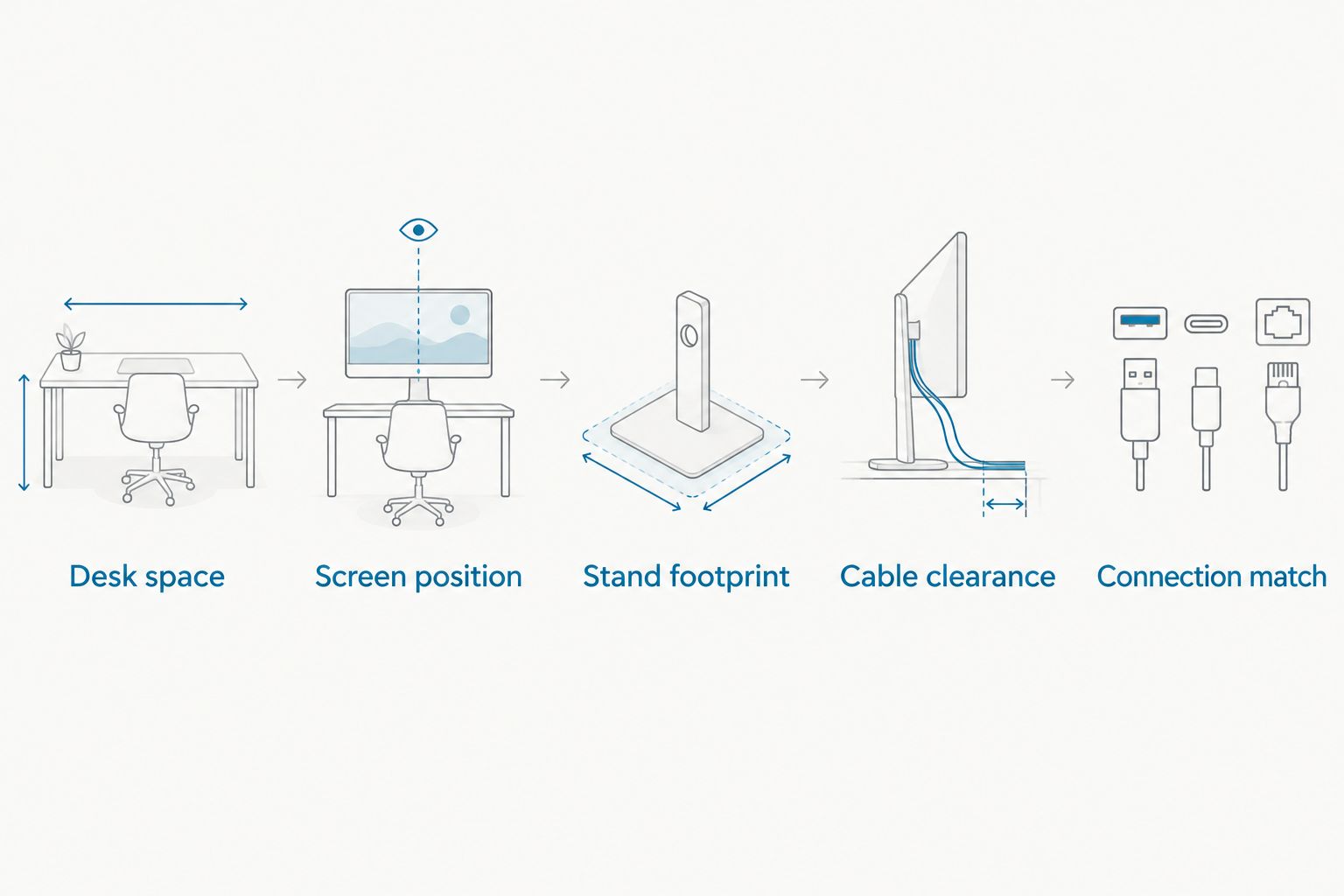
Use this sequence for any gaming monitor purchase in 2026. Keep measurements in consistent units so you can compare your desk directly with the manufacturer's dimensions.
- Desk space: Measure the usable surface, excluding anything permanently occupied by speakers, a computer, or other equipment.
- Screen position: Mark where the display should sit while leaving your keyboard and mouse usable.
- Stand footprint: Compare the actual base dimensions with the space remaining. Check whether the base projects in front of the screen.
- Cable clearance: Allow room behind the connectors without forcing plugs against a wall or shelf.
- Connection match: Confirm the exact input, cable requirement, resolution, and refresh-rate combination before ordering.
A shelf above the desk creates another constraint: overall height. Include the stand and intended adjustment position rather than checking panel size alone.
If you plan to use an arm, confirm the monitor's mounting pattern and weight against the arm specification. Then check whether the desk can accept the clamp or other attachment; buying an arm does not automatically solve a shallow-desk problem.
Compare the exact catalog versions
Scott Radio & Electronics lists the following gaming monitor models. Match the full model code before ordering: ES07D03 and ES07DC9 identify different finishes, while ES07EF5 and ES07EFB distinguish the two Spectrum Black listings discussed above.


When fit is uncertain, contact Scott Radio & Electronics with the full monitor model, desk measurements, and photos showing the desktop and rear clearance. Include your computer model and a clear photo of its ports when asking about connections. Ask specifically about stand contents, footprint, and the operating mode you need; do not substitute a general compatibility question for those details.
How the shortlist is ranked
This 2026 ranking uses the supplied catalog specifications, not claimed hands-on testing. The order favors a defined mixed-use default, then separates glossy preference, high-refresh QHD gaming, and the glass-equipped option.
Physical fit remains a purchase condition for every pick. No listed screen diagonal proves that a stand fits your desk, and an HDR label alone does not establish measured HDR performance.
Which gaming monitor should you choose?
Choose the DOUGH ES07D03 unless you have a specific reason to prefer glossy or high-refresh QHD OLED. It is the default here because its listed matte finish, 4K resolution, and USB-C dock address a clear mixed-use setup.
Choose the DOUGH ES07DC9 for glossy, the DOUGH ES07EF5 for refresh-rate-focused QHD OLED, and the DOUGH ES07EFB specifically for Gorilla Glass. For a 2026 small-desk purchase, wait rather than guess if the stand footprint or connection mode is still unresolved.
FAQ
What's the best gaming monitor here for a small desk?
The DOUGH ES07D03 Spectrum One Matte is the default pick for a matte 4K setup with USB-C docking. Confirm the stand footprint and rear cable clearance before buying; its 27-inch diagonal does not establish overall desk fit.
Is a 27-inch gaming monitor small enough for my desk?
A 27-inch gaming monitor fits only when its overall dimensions, stand, and cable clearance work with your desk. Measure the space left after placing your keyboard and mouse, then compare the exact monitor dimensions.
Should I choose the matte or glossy Spectrum One?
Choose the DOUGH ES07D03 for matte or the DOUGH ES07DC9 for glossy. Both supplied listings identify 27-inch 4K HDR displays, 144 Hz, and USB-C docks; assess room reflections before choosing the finish.
Is 480 Hz better than 144 Hz for every setup?
No, a higher listed refresh rate does not make a monitor the right choice for every setup. The DOUGH ES07EF5 and DOUGH ES07EFB list 480 Hz, but your computer, connection, and games must support the operating mode you intend to use.
Does a USB-C dock mean the monitor charges my laptop?
The USB-C dock label alone does not establish laptop charging power. Confirm the monitor's documented power delivery and your laptop's requirements, along with the intended display mode.
Does Gorilla Glass make the DOUGH ES07EFB scratch-proof?
No, the Gorilla Glass designation does not establish scratch-proof construction. Check the manufacturer's handling and cleaning instructions rather than treating the named material as a damage guarantee.
Can I put one of these monitors on an arm?
Confirm the exact monitor's mounting pattern and weight before choosing an arm. Check the arm's limits and your desk's attachment requirements; the supplied product descriptions do not establish those mounting details.
One last thing
Mark the proposed stand footprint on your desk before ordering. Put your keyboard and mouse around that outline and check where the screen would sit. This catches the mismatch that diagonal measurements miss: enough room for the display, but not enough room to use the desk.