Lafayette Telsat 925B Speaker vs Replacement Options
Last Updated: November 17, 2026
Quick Summary
The best replacement for a Telsat 925B speaker is one that matches the radio’s impedance, power handling and connector, not just its size. Confirm the impedance marking on the original or the radio’s documentation before ordering a telsat 925b speaker from any listing.
- Check the radio’s documentation or the original speaker marking for the required impedance before buying.
- Verify impedance, power handling, physical fit and connector type, in that order, before confirming compatibility.
- Test a used speaker with a multimeter and at low volume before installing it in the radio.
- Power off the radio before connecting or disconnecting any speaker wiring to avoid damaging the output stage.
- An external speaker works only if your radio has an external jack that accepts the speaker’s plug.
Table of Contents
- Why the Telsat 925B Speaker Needs Careful Matching
- Lafayette Telsat 925B Speaker Impedance and Power Handling
- How to Identify a Compatible CB Radio Speaker
- Internal vs. External Speaker Options for the 925B
- Side-by-Side Comparison of Compatible Speaker Options
- Vintage CB Radio Speaker Testing Before Installation
- Choosing Your Telsat 925B Speaker and Placing Your Order
- Frequently Asked Questions
Why the Telsat 925B Speaker Needs Careful Matching
Choosing a replacement speaker for a Telsat 925B is harder than it looks. A speaker that fits the hole does not always match the radio’s electrical requirements. A mismatch can leave the audio weak, distorted, or in the worst case, damage the audio output stage.
The Telsat 925B, like many vintage CB sets, was built around a specific speaker impedance and power level. Parts from the same brand family can differ in both, so a part number alone is not enough. We recommend confirming impedance, power handling, and connector type before ordering anything.
Lafayette Telsat 925B Speaker Impedance and Power Handling
Speaker impedance is the single most important specification to check. Check the radio’s own documentation or the marking on the original speaker before buying, since the required impedance varies between sets. A speaker with the wrong impedance can reduce output or strain the audio circuit.
Reading the Impedance Marking
Look for the impedance printed on the speaker frame or magnet assembly. Many Lafayette speakers carry a code or model stamp rather than a plain ohm rating. The Lafayette LM-100 Speaker 8 Ohm, for example, is marked 8P04SA, which tells you its rating directly. When a marking is missing or worn, compare the speaker’s physical dimensions and mounting pattern against the original before relying on it.
Power Handling and Connector Requirements
Power handling tells you how much audio energy the speaker can take without distorting or failing. A speaker rated too low for the radio’s output may sound harsh at higher volume. Connector type matters just as much. Vintage radios often use solder leads or specific plugs, so check how the replacement connects before you commit. The ABBREE external speaker, for instance, uses a 3.5mm plug and a 1.8m cable, so it suits only a radio with a matching jack.
How to Identify a Compatible CB Radio Speaker
Treat compatibility as something you verify rather than something you assume. The goal is to confirm four things in order: impedance, power handling, physical fit, and connector type. If any one of them is unverified, the speaker is not confirmed compatible.
Step 1: Establish the radio’s requirement. The 925B is a vintage set, and the original speaker is the best evidence of what the radio expects. If the original is still in place, read its markings before removing it. If it is gone, check the radio’s service documentation or the marking near the speaker leads. Confirm the required speaker impedance rather than assume it, because the audio output stage is designed around a specific load.
Step 2: Read the candidate speaker’s markings. Look on the frame, the magnet, and the back of the cone. Some Lafayette speakers carry a stamped code instead of a plain ohm rating. A marking such as 8P04SA on an LM-100 identifies an 8-ohm unit; a back marking such as 0770802 identifies a specific model. Photograph the back of both the original and the candidate so you can compare them side by side.
Step 3: Measure the physical fit. Record the speaker diameter or rectangular dimensions, the mounting-hole spacing, the depth behind the mounting plane, and the position of the terminals. A speaker that is the right impedance but too deep will not clear the chassis, and one with a different hole pattern will not mount without drilling.
Step 4: Confirm the connector. Vintage radios use solder leads, spade terminals, or specific plugs. Match the replacement’s termination to what the radio provides. A 3.5mm plug only works if the radio has a matching external jack; solder leads only work if you can solder to the original wiring without damaging the board.
Step 5: Get the seller to confirm in writing.
Watch out: a speaker that fits the hole and plugs in can still be the wrong load, and running a mismatched impedance can stress the audio output stage. Confirm the ohm rating before you power the radio.
Internal vs. External Speaker Options for the 925B
Many owners prefer to keep the original internal speaker. A matching internal part is one way to keep the radio’s original layout. An internal replacement must fit the speaker cavity and mount the same way as the original.
An external speaker is a practical alternative when the internal unit has failed and no matching part is available. External speakers plug into the radio’s external speaker jack and sit outside the chassis. The ABBREE rectangular external speaker, priced at $28.99, is an example. It is rated at 5W with a 3.5mm plug, so confirm your radio’s external jack accepts that connector before ordering. An external speaker changes the look of the station.
Side-by-Side Comparison of Compatible Speaker Options
The table below compares the speakers currently available from Scott Radio & Electronics. Always verify the impedance marking and connector against your own radio before purchasing.
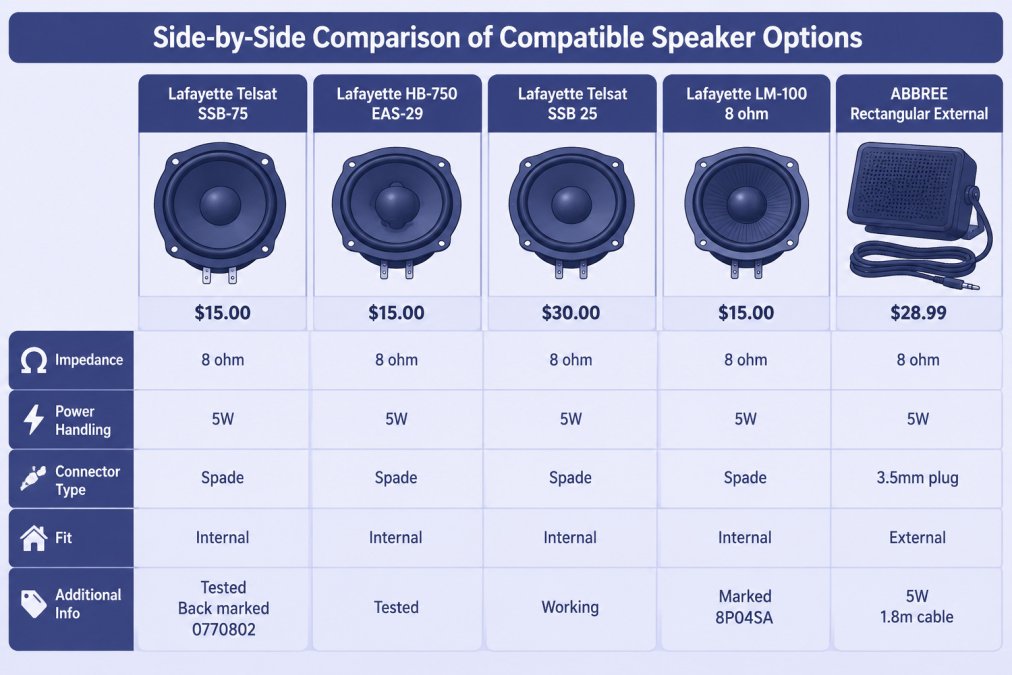
| Speaker | Price | Key Detail | Fit Type | Best For |
|---|---|---|---|---|
| Lafayette Telsat SSB-75 Speaker (tested) | $15.00 | Back marked 0770802 | Internal | Owners matching this exact model marking |
| Lafayette HB-750 Speaker EAS-29 (tested) | $15.00 | Marked EAS-29, wire leads shown | Internal | Wire-lead connections |
| Lafayette Telsat SSB 25 Working Speaker | $30.00 | Working speaker only | Internal | Buyers wanting a higher-priced working unit |
| Lafayette LM-100 Speaker 8 Ohm | $15.00 | Marked 8P04SA, round | Internal | 8-ohm applications |
| ABBREE External Speaker | $28.99 | 5W, 3.5mm plug, 1.8m cable | External | Owners who cannot source an internal part |
Price
Pros and cons by option:
- Lafayette Telsat SSB-75: Pro: tested, lowest price, clear back marking. Con: used with cosmetic wear.
- Lafayette HB-750 EAS-29: Pro: tested, shows wire leads clearly. Con: different model family, so confirm fit first.
- Lafayette Telsat SSB 25: Pro: working unit at a higher price. Con: listing gives little detail beyond the description.
- Lafayette LM-100 8 Ohm: Pro: impedance is marked on the speaker. Con: fits only radios using this mounting pattern.
- ABBREE External: Pro: easy to install with screws and a plug-and-play cable. Con: visible outside the chassis, and it needs a compatible jack.
Vintage CB Radio Speaker Testing Before Installation
A used speaker can look fine and still be electrically wrong, so test it in stages before it goes anywhere near the radio. The sequence below moves from the least risky check to the most, so a bad speaker is caught before it can stress the audio output stage.
1. Visual and physical inspection. Check the cone for tears, the surround for rot or cracking, and the frame for bends. Look at the voice-coil leads where they meet the terminals; a broken or frayed lead is a common failure on old speakers. Gently press the cone inward and release it. It should move smoothly and return without rubbing or scraping.
2. Resistance check with a multimeter. Set the meter to its lowest resistance range and measure across the two terminals. A speaker’s DC resistance reading on a multimeter is normally lower than its nominal impedance rating. A reading of zero, a reading that jumps wildly, or an open circuit means the voice coil is damaged. Compare the reading against the rating marked on the speaker; a large mismatch means the part is not what it claims to be.
3. Low-volume listening test on a known source. Connect the speaker to a known-good audio source at low volume first, not to the radio. Listen for crackling, rattle, or silence. A speaker that distorts at low volume will not improve once installed. Raise the volume gradually and stop at the first sign of harshness.
4. Insulation and short check. Confirm neither terminal is shorted to the metal frame. A shorted speaker can damage the radio’s output stage the moment it is connected. With the meter still on resistance, measure from each terminal to the frame; you should read open circuit.
5. Install and test at low volume. Power the radio off before connecting or disconnecting any speaker wiring. Connect the speaker, power on, and bring the volume up slowly while listening for distortion. If the audio is weak or distorted at low volume, power down and recheck the impedance and wiring before continuing.
Watch out: never connect or disconnect a speaker while the radio is powered on, because the brief open circuit can damage a vintage audio output stage. Keep the radio off until every connection is made and checked.
If the original speaker is beyond repair, a step-by-step guide on replacing paper cone vintage radio speakers can help you decide whether to rebuild it or move to a compatible replacement. Read the safe repair guide for vintage paper cone speakers before you begin.
Choosing Your Telsat 925B Speaker and Placing Your Order
Confirm three things before you order: the impedance, the power rating, and the connector. If you still have the original speaker, match its markings against the listing. If you plan to use an external speaker, check that your radio has an external jack that accepts a 3.5mm plug.
When you are ready, pick the speaker that matches your radio and your budget, then add it to your cart. Each listing shows the part’s condition and photos, so review them before purchase.
Frequently Asked Questions
What speaker is compatible with the Lafayette Telsat 925B?
Compatibility depends on matching the impedance, physical size and connector of the original speaker. Compare the listing of each candidate, including its marking and wire leads, against your radio before buying. Options such as the Lafayette LM-100 8 ohm speaker, marked 8P04SA, and the Lafayette Telsat SSB-75 speaker, back marked 0770802, are tested used parts that you can check against your radio’s specifications. Confirm the fit with photos and dimensions before ordering, since listings cover only the pictured parts.
How do I check the impedance of a Lafayette Telsat 925B speaker?
Look for an impedance marking printed on the speaker magnet or frame, typically written as 8 ohm. If no marking is visible, measure the speaker’s DC resistance with a multimeter; a reading near 6 to 8 ohms usually indicates an 8 ohm voice coil. Match the impedance of the replacement to the original speaker to avoid stressing the audio output stage.
Can I use an external speaker with a Lafayette Telsat 925B?
Yes, an external speaker can be connected if its impedance, power rating and plug type suit your radio’s external speaker jack. An example is the ABBREE rectangular external speaker, which has a 3.5mm plug, a 1.8m cable and a 5W power output. Check the connector on your radio before buying, and avoid driving a low-impedance load beyond the radio’s rating. Testing the speaker with a low volume setting first helps protect the audio stage.
How can I test a vintage CB radio speaker before installing it?
Start with a continuity check using a multimeter on the resistance setting; a working voice coil shows a steady resistance reading with no open circuit. Next, connect the speaker to a low-power audio source at modest volume and listen for clear, undistorted sound. Inspect the cone and surround for tears before testing, and never connect a speaker that shows a short circuit to the radio’s output.