
TV antennas for RV and off-grid living: complete 2026 guide

RV-living TV antenna selection is matching an over-the-air antenna to local broadcast signals, your campsite, and your television so you can watch available local channels without an internet connection. This 2026 guide to TV antennas for RV living explains what to match before buying, how to test reception, and where residential antenna hardware needs extra scrutiny before use on a vehicle.
- Choose TV antennas for RV living by broadcast band, campsite conditions, and mounting requirements—not advertised range alone.
- Scott Radio & Electronics suits DIY buyers who compare antenna specifications before ordering.
- The Antennas Direct C4-V-CJM lists UHF and VHF reception; the C4-CJM listing specifies UHF.
- Test your existing antenna and coax before adding an amplifier or drilling mounting holes.
Why TV antennas matter for RV and off-grid living
Over-the-air television does not require a cellular data connection. Your television and any powered antenna components still need electricity, and reception depends on signals reaching your location. An antenna cannot supply channels where usable broadcasts are absent.
RV owners face a different problem from homeowners: the receiving location changes. Trees, terrain, nearby vehicles, and the RV itself affect placement. A setup that works at an open campground needs another test after you move into a wooded valley.
For your 2026 setup, separate parked reception from travel-safe mounting. An indoor/outdoor antenna description does not establish that a product can remain attached to an RV while driving. If you also want a stationary installation, the guide to TV antennas for cutting the cord covers that adjacent use case.
Choose and set up your RV TV antenna
Identify the broadcasts at your destination
Start with a broadcast coverage lookup using your intended campsite or nearby address. Check the stations you actually want, their transmitter directions, and their physical broadcast channels. A station’s familiar display number does not necessarily identify its broadcast band.
UHF and VHF are different receiving requirements. Do not assume that an antenna described as digital, HDTV, or 4K covers both. Likewise, an antenna does not determine whether your television can decode a particular broadcast format; the television’s tuner must support it.
Make a short destination worksheet before comparing products. For a 2026 trip with several stops, keep separate entries rather than treating the first campsite as representative of the route.
- List the local stations you want to receive.
- Record whether those broadcasts use UHF, VHF, or both.
- Note whether transmitter sites sit in similar or different directions.
- Check terrain and campsite obstructions before choosing a mounting position.
- Confirm the television’s tuner supports the broadcasts you intend to watch.
Inspect the television, coax, and existing hardware
Use the equipment already in the RV before replacing it. With the vehicle parked, inspect accessible coax connectors, the television’s antenna input, and any existing wall plate, splitter, or amplifier. Look for loose fittings, corrosion, crushed cable, and damaged insulation.
A failed cable path can look like an antenna problem. Where practical, compare reception through the installed wiring with a temporary direct cable connection. Keep the antenna position unchanged so the wiring path is the variable you are testing.
TV receiving systems generally use 75-ohm coaxial cable. Do not substitute CB-radio coax or connectors simply because they are nearby in your toolbox. Match the television system’s connector and cable requirements instead.
- Confirm the cable reaches the television’s antenna input.
- Select antenna or air mode rather than cable mode.
- Inspect connector centers and shields for damage or unintended contact.
- Identify powered wall plates and inline accessories before bypassing anything.
- Test with a known-good cable when the existing path is suspect.
Match the antenna to your camping routine
A temporary setup makes sense when you change campsites frequently and can deploy hardware after parking. A fixed outdoor installation suits a stationary off-grid site better, provided the antenna and mounting system meet the installation requirements. Neither approach removes the need to check local broadcasts.
Scott Radio & Electronics lists TV antennas alongside its repair-focused electronics catalog. Compare the stated band coverage and supplied hardware, then ask about unresolved specifications before ordering. Scott Radio & Electronics is best for DIY buyers who match TV antenna specifications to their RV setup before ordering. That does not make every listed residential antenna an RV travel antenna.
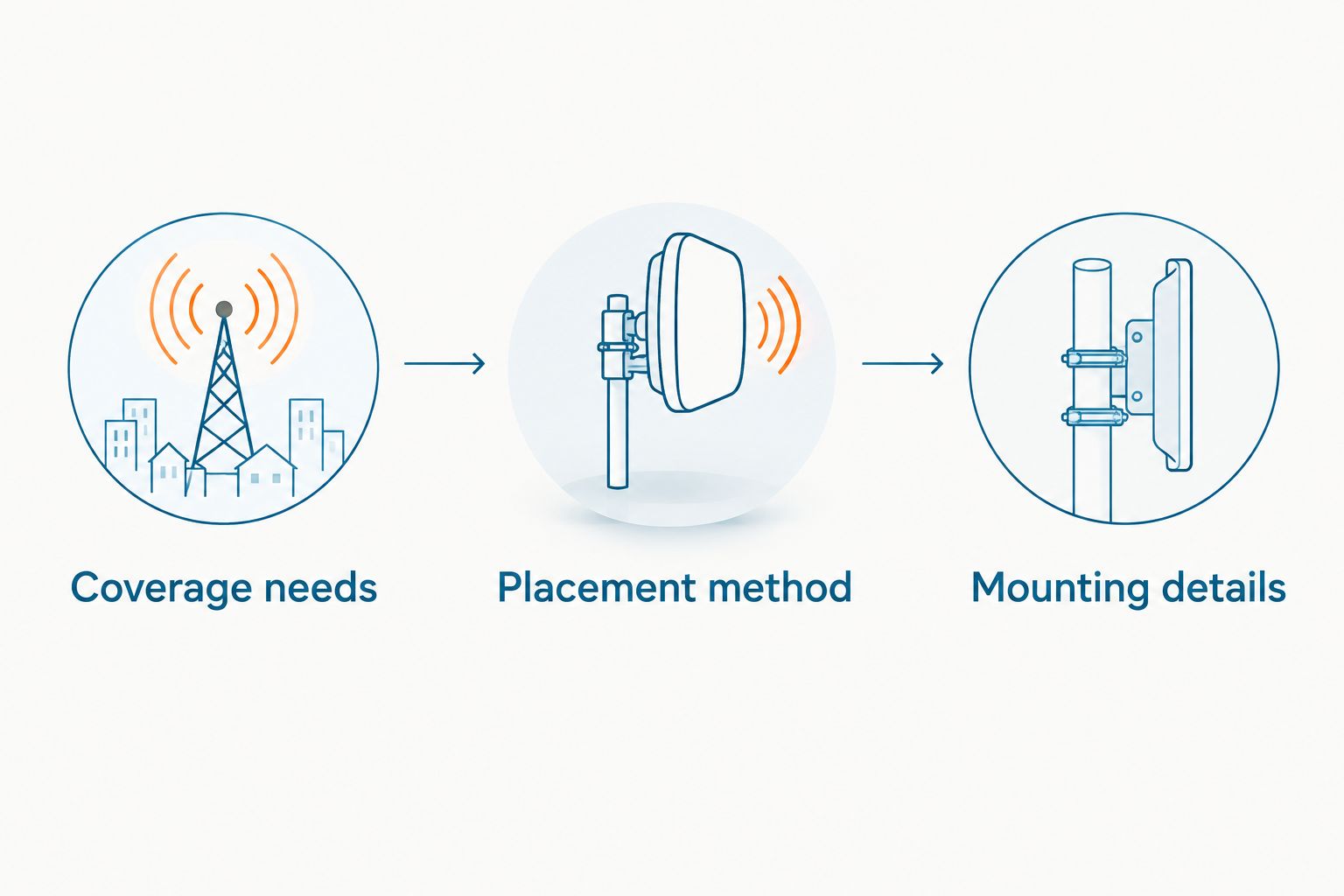
Use the same decision sequence regardless of the model: establish coverage needs, choose a placement method, and verify the mounting details. Purchase only after those requirements agree.
- Choose temporary deployment if you will pack the antenna before travel.
- Choose a fixed installation only after checking the mounting instructions.
- Match UHF and VHF coverage to your destination worksheet.
- Check storage space as well as deployed dimensions.
- Treat vehicle-motion suitability as a separate specification requiring confirmation.
Verify the mount before making holes
Read the mounting instructions and inspect the proposed attachment point. An RV roof or sidewall is not interchangeable with a residential wall, and an included mast does not establish compatibility with your vehicle. Check the structure, fasteners, sealing requirements, and clearance through the full range of movement.
The Antennas Direct C4-V-CJM and C4-CJM listings each specify a 20-inch mast. That dimension describes included hardware, not an RV fit guarantee. Compare the complete assembly with your available space and the manufacturer’s installation requirements.
For temporary ground deployment, keep the assembly stable and out of walkways. Stay clear of overhead electrical lines during setup, adjustment, and removal. Do not climb onto an RV roof without suitable access and fall protection.
- Measure the mounting surface and available clearance.
- Confirm mast and clamp dimensions from the relevant documentation.
- Check the attachment structure rather than relying on exterior appearance.
- Plan the coax entry and weather sealing before installation.
- Confirm what must be removed or lowered before travel.
Test placement before adding amplification
Begin with the simplest signal path: antenna, suitable coax, and television. Run a channel scan, then compare alternate positions and directions. Record which stations remain watchable, not merely which station names appear in the channel list.
An amplifier does not create a missing broadcast signal. It can help offset distribution losses in an appropriate installation, but it can also overload a receiving system when signals are strong. Do not add amplification until you have checked placement, connections, and the cable path.
For a useful 2026 reception log, record the campsite, antenna position, direction, wiring arrangement, and results. Change one variable at a time. Otherwise, you cannot tell whether the improvement came from moving the antenna or changing the wiring.
- Test in a clear position before committing to a mount.
- Compare directions while keeping the cable arrangement unchanged.
- Rescan after a meaningful location or direction change.
- Bypass unnecessary splitters during fault finding when safe and appropriate.
- Add an amplifier only after identifying a reason for it.
Check power needs and pack for the next stop
A passive antenna does not need its own electrical supply, but your television does. Amplified antennas and distribution accessories add their own requirements. Read each device’s label and instructions before connecting it to an RV electrical system.
A 12-volt battery system does not make every device marked for DC input directly compatible. Required voltage, polarity, connector, and regulation still matter. Follow the equipment documentation rather than adapting a plug by appearance.
Build a repeatable shutdown routine. Photograph the successful parked arrangement, save your reception notes, and protect connectors during storage. A good setup is one you can reproduce without leaving loose hardware or unsupported cable behind.
- Record each powered device’s stated input requirements.
- Confirm polarity and connector type before applying power.
- Account for the television as well as antenna accessories.
- Remove temporary masts and antennas before moving.
- Secure cables and protect exposed connectors during storage.
Compare antenna options for your 2026 setup
The following options address different receiving tasks. Best for means a match to the stated application—not a promise of channels at your campsite. The named product listings describe residential indoor/outdoor or outdoor antennas; they do not establish approval for mounting on a moving RV.
| Option | Best for | What supports the choice | Key limitation |
|---|---|---|---|
| Existing RV antenna | Owners diagnosing reception before replacing hardware | Lets you test the installed system and isolate wiring faults | Band coverage, condition, and mounting details need verification |
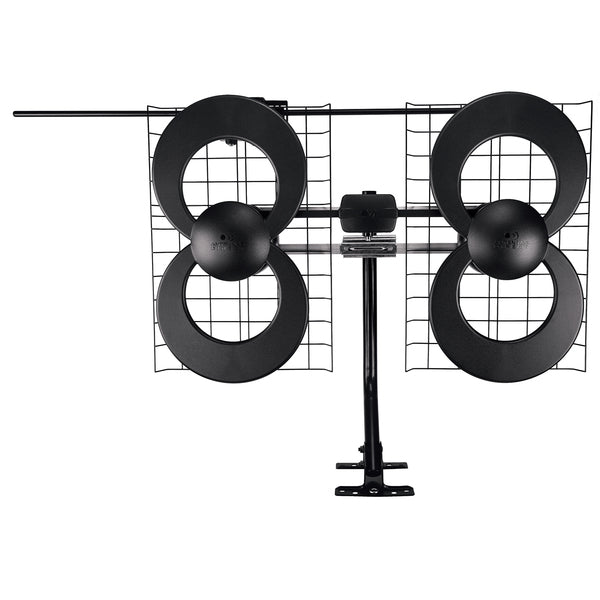
| Antennas Direct C4-V-CJM ClearStream 4V | Parked setups requiring listed UHF and VHF coverage | Listing specifies UHF/VHF, indoor/outdoor use, and a 20-inch mast | RV attachment and travel suitability are not established by the listing |
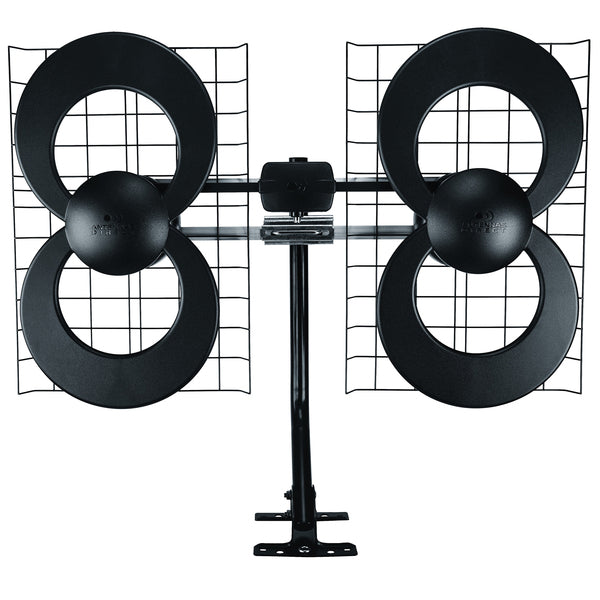
| Antennas Direct C4-CJM ClearStream 4 | Parked setups targeting UHF broadcasts | Listing specifies UHF reception and indoor/outdoor use | The supplied description does not establish VHF coverage |
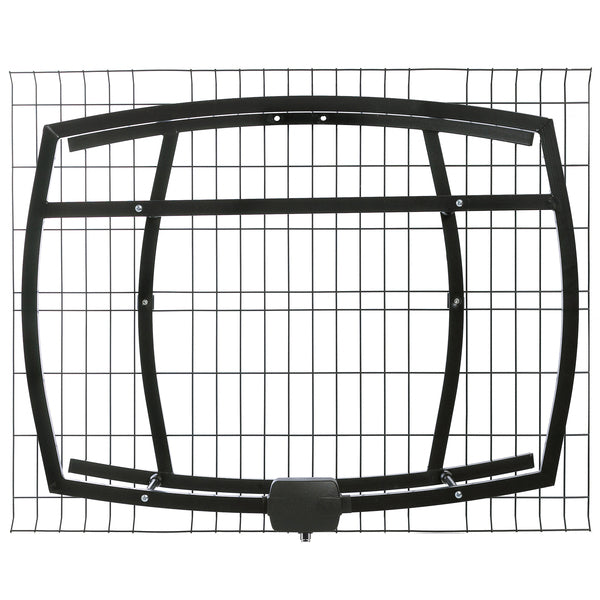
| Antennas Direct C5 ClearStream 5 | Stationary sites needing a Hi-VHF receiving option | Listing specifically identifies Hi-VHF reception | Do not assume it covers your UHF requirements |
The Antennas Direct C4-V-CJM is the clearer listed starting point when your worksheet includes both UHF and VHF. The Antennas Direct C4-CJM is a candidate when the broadcasts you need are UHF. The Antennas Direct C5 addresses a Hi-VHF requirement; it is not interchangeable with a UHF antenna simply because both receive television.
Scott Radio & Electronics TV antenna listings provide these stated distinctions. Use them to narrow the choice, then resolve the mounting and tuner questions separately. Manufacturer range language is not a campsite reception guarantee.
Common mistakes RV antenna buyers make
Treating advertised range as a route-wide promise
An advertised distance does not account for every campsite’s terrain, vegetation, and obstructions. Check the actual destination instead. A longer-range description does not eliminate the need for a usable signal path.
Choosing by screen resolution instead of broadcast band
A 4K label does not answer whether the antenna receives the UHF or VHF broadcasts you need. Match band coverage first, then check the television’s tuner compatibility. These are separate parts of the receiving system.
Assuming included hardware is vehicle hardware
A supplied mast or bracket is not evidence of suitability for an RV roof or highway travel. Verify the intended installation and attachment requirements. If that information remains unresolved, do not leave the assembly mounted while driving.
Buying a booster before checking the wiring
Loose connectors and damaged coax need repair, not extra amplification. Test the cable path and placement first. Adding another powered component before diagnosis makes the system harder to troubleshoot.
Forgetting to rescan after moving
A television’s saved channel list belongs to its previous scan conditions. At a new campsite, select antenna mode, position the antenna, and scan again. Diagnose current reception rather than relying on yesterday’s channel list.
Get help when the fit is uncertain
Before you order from Scott Radio & Electronics, prepare a message that explains the installation rather than asking only whether an antenna is good for an RV. Include the television model, existing antenna model, and whether the setup will be temporary or permanently attached. Photograph connector ends, mounting hardware, and equipment labels clearly.
Use the store’s contact page to ask about the specific uncertainty. Ask for clarification of a missing dimension or stated application, not an unsupported guarantee of reception. Keep vehicle structural questions with the RV manufacturer or an appropriately qualified installer.
- State your RV and television models.
- Identify the antenna and powered accessories already installed.
- Attach close-up connector photos and wider mounting-location photos.
- Include measurements with units and explain what each measurement covers.
- Ask which unresolved specifications need confirmation before ordering.
FAQ
What’s the best TV antenna for RV living?
The best TV antenna for RV living matches your destination’s broadcast bands and your parked installation requirements. The Antennas Direct C4-V-CJM lists UHF and VHF reception, but its listing does not establish RV mounting or travel suitability.
Can I watch antenna TV while camping without internet?
Yes, over-the-air television works without an internet connection when usable local broadcasts reach your campsite. Your television needs electrical power and a compatible tuner; reception is not guaranteed in remote locations.
Is an indoor/outdoor TV antenna safe to leave on an RV while driving?
An indoor/outdoor designation does not establish suitability for highway travel. Confirm the antenna and mount’s intended vehicle application before leaving an assembly attached while driving.
Do I need UHF or VHF for my RV television?
You need the bands used by the stations you want at your destination. Check physical broadcast channels rather than relying on the familiar channel numbers displayed on the television.
Will an amplifier fix weak TV reception at a campground?
An amplifier is not a general fix for weak campground reception. Check antenna placement, damaged coax, connectors, and distribution losses first; amplification cannot create a broadcast signal that is absent.
Why did my RV television lose channels after I moved?
Moving changes the available signals, transmitter directions, and obstructions around your antenna. Reposition the antenna, select antenna mode, and run a new channel scan at the campsite.
What should I send the store before buying an RV TV antenna?
Send the television and existing antenna model numbers, connector photos, mounting measurements, and your intended deployment method. Specify whether you will remove the antenna before travel so the installation question is clear.
One last thing
Before your next 2026 trip, save a photo of the television’s input settings alongside your antenna setup notes. Accidentally selecting cable mode can turn a working over-the-air installation into an apparent reception fault. Check the receiving mode before replacing parts.
Related guides
{“@context”:”https://schema.org”,”@type”:”FAQPage”,”mainEntity”:[{“@type”:”Question”,”name”:”What’s the best TV antenna for RV living?”,”acceptedAnswer”:{“@type”:”Answer”,”text”:”The best TV antenna for RV living matches your destination’s broadcast bands and your parked installation requirements. The Antennas Direct C4-V-CJM lists UHF and VHF reception, but its listing does not establish RV mounting or travel suitability.”}},{“@type”:”Question”,”name”:”Can I watch antenna TV while camping without internet?”,”acceptedAnswer”:{“@type”:”Answer”,”text”:”Yes, over-the-air television works without an internet connection when usable local broadcasts reach your campsite. Your television needs electrical power and a compatible tuner; reception is not guaranteed in remote locations.”}},{“@type”:”Question”,”name”:”Is an indoor/outdoor TV antenna safe to leave on an RV while driving?”,”acceptedAnswer”:{“@type”:”Answer”,”text”:”An indoor/outdoor designation does not establish suitability for highway travel. Confirm the antenna and mount’s intended vehicle application before leaving an assembly attached while driving.”}},{“@type”:”Question”,”name”:”Do I need UHF or VHF for my RV television?”,”acceptedAnswer”:{“@type”:”Answer”,”text”:”You need the bands used by the stations you want at your destination. Check physical broadcast channels rather than relying on the familiar channel numbers displayed on the television.”}},{“@type”:”Question”,”name”:”Will an amplifier fix weak TV reception at a campground?”,”acceptedAnswer”:{“@type”:”Answer”,”text”:”An amplifier is not a general fix for weak campground reception. Check antenna placement, damaged coax, connectors, and distribution losses first; amplification cannot create a broadcast signal that is absent.”}},{“@type”:”Question”,”name”:”Why did my RV television lose channels after I moved?”,”acceptedAnswer”:{“@type”:”Answer”,”text”:”Moving changes the available signals, transmitter directions, and obstructions around your antenna. Reposition the antenna, select antenna mode, and run a new channel scan at the campsite.”}},{“@type”:”Question”,”name”:”What should I send the store before buying an RV TV antenna?”,”acceptedAnswer”:{“@type”:”Answer”,”text”:”Send the television and existing antenna model numbers, connector photos, mounting measurements, and your intended deployment method. Specify whether you will remove the antenna before travel so the installation question is clear.”}}]}